Your face changes more than your fingerprints, making facial recognition more sensitive to temporary physical changes like swelling or new glasses.
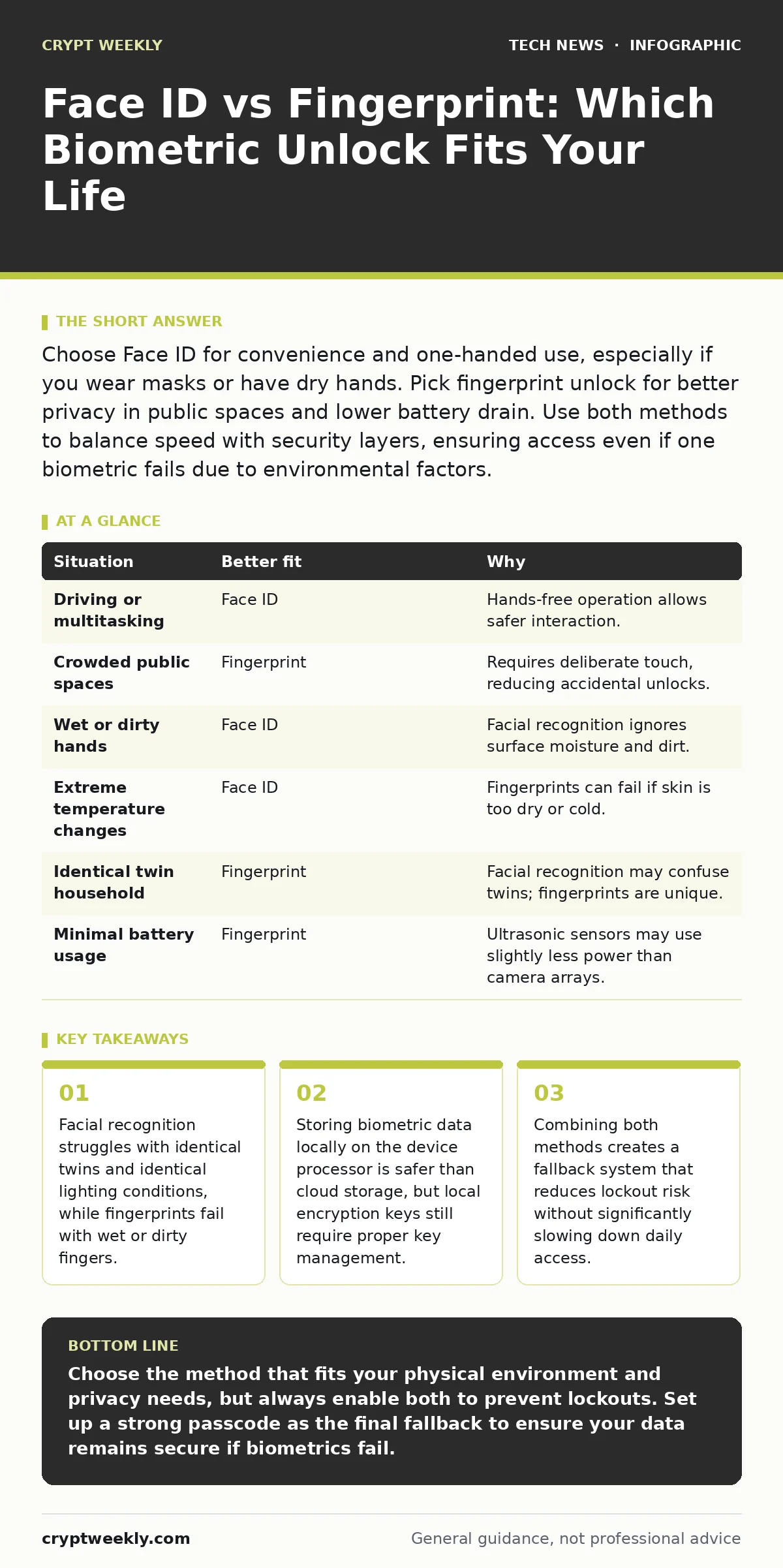
Choose Face ID for convenience and one-handed use, especially if you wear masks or have dry hands. Pick fingerprint unlock for better privacy in public spaces and lower battery drain. Use both methods to balance speed with security layers, ensuring access even if one biometric fails due to environmental factors.
Does Your Environment Favor Light or Touch?
Facial recognition relies on structured light sensors and infrared cameras. These components map the contours of your face in three dimensions. This process works quickly in bright or dim light. However, direct sunlight can sometimes confuse the sensors. Fingerprint sensors use capacitive or ultrasonic technology to read the ridges of your skin. They work well in most lighting conditions. The trade-off is physical contact. You must touch the device, which requires two hands or a specific grip. If you often use your device while driving or holding a child, facial recognition is more practical.
How Do You Handle Physical Changes?
Your face changes more frequently than your fingerprints. Weight fluctuations, facial hair growth, and new eyewear can disrupt facial recognition. The system adapts over time, but sudden changes may cause failures. Fingerprint scanners are less affected by weight changes. However, they are highly sensitive to surface conditions. Wet hands, dry skin, or minor cuts can prevent a match. If you work with water, chemicals, or in extreme temperatures, fingerprints may fail more often. Facial recognition ignores surface moisture. It looks at shape, not texture. This makes it more resilient to dirty or wet hands.
Imagine you are working in a kitchen with wet hands. A fingerprint scanner will likely reject you. A facial scanner will open the device instantly. Now imagine you are wearing a new pair of thick glasses. The facial scanner may hesitate. The fingerprint scanner will not care. You must weigh which physical change is more likely in your daily routine.
What Is Your Privacy Exposure?
Facial recognition requires your face to be visible to the sensor. This means the sensor must be active and looking at you. In crowded places, this can feel invasive. Some systems allow you to lock the device if it detects another person nearby. Fingerprint scanning requires deliberate action. You must place your finger on the sensor. This intentional touch provides a layer of consent. You are less likely to be unlocked by someone else standing next to you. The privacy benefit is not about data theft. It is about accidental unlocking. If you drop your device in a crowd, a fingerprint lock stays locked. A face lock might open if it sees your face from an angle.
Do You Need a Fallback for Failure?
No biometric system is perfect. Facial recognition can fail with identical twins. Fingerprint scanners can fail with damaged ridges. Relying on a single method increases the risk of being locked out. Using both methods provides redundancy. If your face is swollen, you can use your fingerprint. If your finger is wet, you can use your face. Most devices allow you to register multiple fingerprints and one face. This setup does not slow down daily use. It only adds a step when the primary method fails. The cost is the time to set up the second method. The benefit is continuous access.
| Situation | Better fit | Why |
|---|---|---|
| Driving or multitasking | Face ID | Hands-free operation allows safer interaction. |
| Crowded public spaces | Fingerprint | Requires deliberate touch, reducing accidental unlocks. |
| Wet or dirty hands | Face ID | Facial recognition ignores surface moisture and dirt. |
| Extreme temperature changes | Face ID | Fingerprints can fail if skin is too dry or cold. |
| Identical twin household | Fingerprint | Facial recognition may confuse twins; fingerprints are unique. |
| Minimal battery usage | Fingerprint | Ultrasonic sensors may use slightly less power than camera arrays. |
How Do You Manage the Trade-offs?
The best choice depends on your specific habits. There is no universal winner. Facial recognition offers speed and convenience. It integrates seamlessly with one-handed use. Fingerprint scanning offers control and privacy. It requires intention. You should consider your environment, your physical changes, and your privacy needs. Do not ignore the possibility of failure. Plan for it by setting up both methods. This approach ensures you are never locked out. It also balances the convenience of face unlock with the security of touch.
Why Use Both Methods Together?
Using both methods is not just about backup. It is about layering security. Biometrics are convenience features, not absolute security barriers. They are designed to unlock quickly. If you need high security, you should use a strong passcode. Biometrics should be the first line, not the only line. By enabling both, you reduce the attack surface. An attacker would need to bypass both methods to gain access. This is unlikely. Most attacks target the weakest link. If you only use one method, that method is the weakest link. Using both forces the attacker to adapt. This adds friction to the attack process.
Key takeaways
- Facial recognition struggles with identical twins and identical lighting conditions, while fingerprints fail with wet or dirty fingers.
- Storing biometric data locally on the device processor is safer than cloud storage, but local encryption keys still require proper key management.
- Combining both methods creates a fallback system that reduces lockout risk without significantly slowing down daily access.
Choose the method that fits your physical environment and privacy needs, but always enable both to prevent lockouts. Set up a strong passcode as the final fallback to ensure your data remains secure if biometrics fail.
Frequently asked questions
Can someone unlock my phone with a photo of my face?
No, modern facial recognition uses structured light or infrared sensors to map depth. A flat photo lacks the three-dimensional data required to match your stored template.
Do fingerprint scanners work with gloves?
Standard capacitive scanners do not work with gloves. Some ultrasonic scanners can work with thin gloves, but most require bare skin to read the ridge patterns accurately.
Is biometric data sent to the cloud?
No, biometric templates are stored locally on your device in a secure hardware enclave. They are not uploaded to cloud servers, reducing the risk of remote data breaches.
What happens if I get a facial injury?
You may need to re-enroll your face in the system. The scanner can adapt to minor changes, but significant injuries may require updating your biometric template to maintain reliability.
How this guide was produced: written by the Crypt Weekly editorial team with AI assistance, checked against the public references listed below, and reviewed when the facts change. See our editorial policy or report an error.