Passkeys replace shared secrets with cryptographic keys, eliminating the server-side target for credential theft and rendering phishing attacks ineffective.
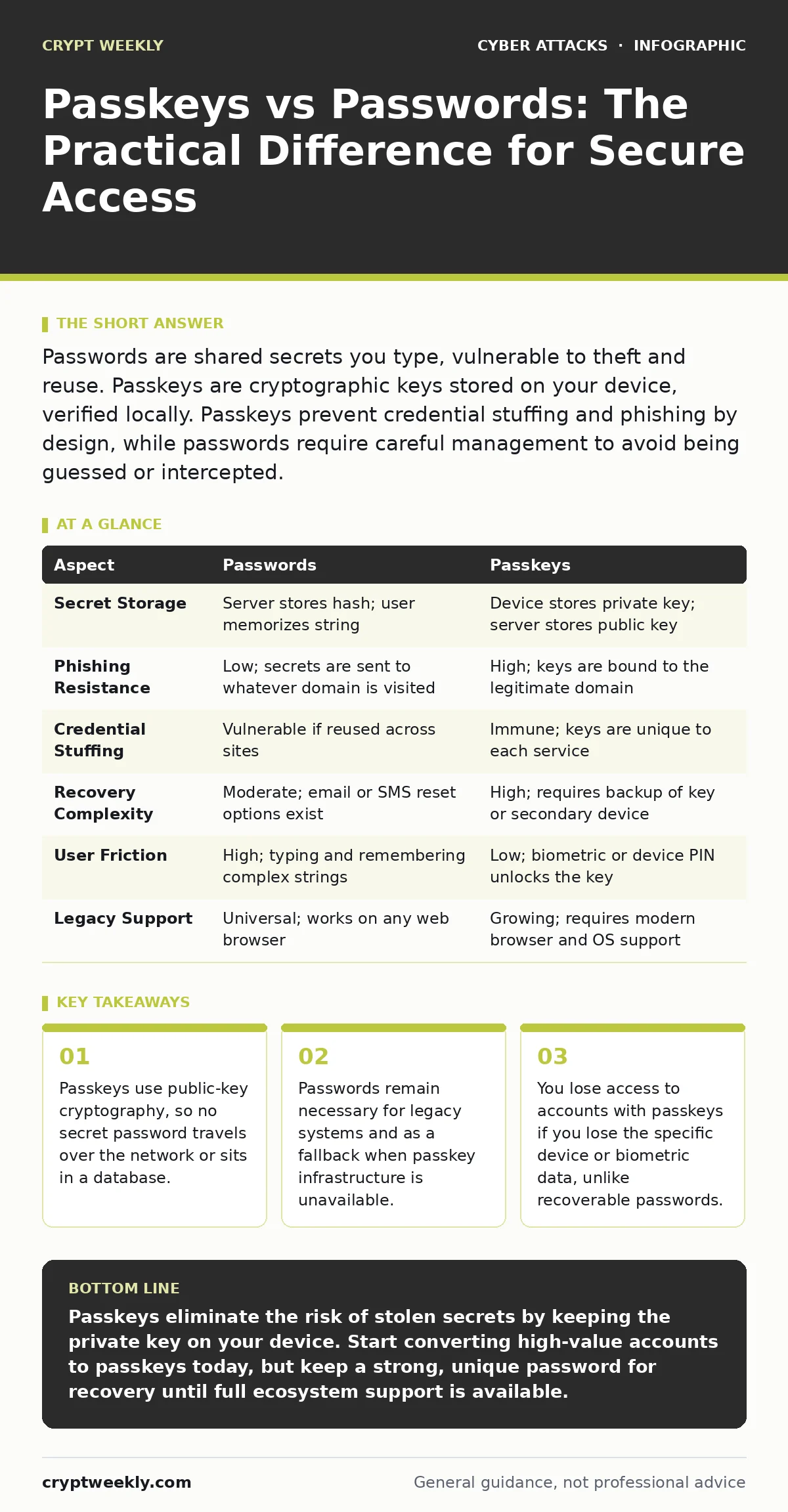
Passwords are shared secrets you type, vulnerable to theft and reuse. Passkeys are cryptographic keys stored on your device, verified locally. Passkeys prevent credential stuffing and phishing by design, while passwords require careful management to avoid being guessed or intercepted.
The Core Mechanism Difference
The fundamental difference lies in how identity is verified. A password is a shared secret. You know it, and the server stores a hashed version of it. If the server is breached, attackers can attempt to reverse those hashes. A passkey is a pair of cryptographic keys. The private key stays on your device, and the public key goes to the server. You never send the private key. This shift changes the security model from protecting a static secret to verifying a dynamic signature.
This architectural change eliminates the most common attack vectors against traditional authentication. Because the private key never leaves your device, there is nothing for an attacker to steal from the server’s database. It also breaks the link between your identity and your credential in a way that passwords do not. This means that even if an attacker intercepts the communication, they cannot reuse the authentication data elsewhere.
How Passwords Create Attack Surface
Passwords rely on the assumption that your secret remains secret. This assumption fails frequently due to human behavior and systemic weaknesses. You likely reuse passwords across multiple services. When one service suffers a breach, attackers use those credentials to attempt logins on other platforms. This automated technique is known as credential stuffing. It works because users prioritize convenience over uniqueness.
Even when you use unique passwords, you face the threat of interception. If you type a password on a malicious website that looks like your bank, you have handed over your secret. This is the basis of angler phishing, where attackers use social media or deceptive links to steal credentials. The server cannot distinguish between a real user typing the password and a fake site capturing it. The secret is compromised the moment it is entered into the wrong field.
Why Passkeys Resist Common Attacks
Passkeys operate on a public-key infrastructure. Your device generates a private key and a corresponding public key. The public key is registered with the service. When you log in, the service sends a challenge. Your device signs that challenge with your private key. The service verifies the signature using the public key. No secret is transmitted.
This process makes phishing technically difficult. The passkey is bound to the specific domain name of the website. If you are on a fake site, your device will refuse to sign the challenge because the domain does not match the registered one. This prevents the credential from being stolen and reused. The attack vector shifts from stealing a secret to compromising the device itself, which is a much higher barrier for most attackers.
Comparison of Security and Usability
| Aspect | Passwords | Passkeys |
|---|---|---|
| Secret Storage | Server stores hash; user memorizes string | Device stores private key; server stores public key |
| Phishing Resistance | Low; secrets are sent to whatever domain is visited | High; keys are bound to the legitimate domain |
| Credential Stuffing | Vulnerable if reused across sites | Immune; keys are unique to each service |
| Recovery Complexity | Moderate; email or SMS reset options exist | High; requires backup of key or secondary device |
| User Friction | High; typing and remembering complex strings | Low; biometric or device PIN unlocks the key |
| Legacy Support | Universal; works on any web browser | Growing; requires modern browser and OS support |
Where Traditional Passwords Still Win
Passkeys are not a universal replacement yet. Many older systems do not support the WebAuthn standard, which is the open protocol behind passkeys. If you are accessing a legacy application or a specialized industry tool, you may be forced to use a password. In these cases, the security of your account depends entirely on the strength of that password and the uniqueness of the string.
Password recovery is also more straightforward. If you lose your phone, you can often reset a password via email or security questions. With a passkey, if you lose the device containing the private key and have no backup, you may be locked out permanently. The trade-off here is convenience versus cryptographic purity. Passwords offer a safety net at the cost of increased vulnerability to theft.
See also: Social Engineering Risks and Protection for Small Businesses · Whaling Attacks: 6 Myths That Leave Executives Exposed
Overlapping Use Cases and Hybrids
Many services now support both methods. This creates a hybrid environment where you can use a passkey for primary login and a password as a backup. This approach mitigates the risk of lockout while maximizing security. However, it introduces a new edge case. Users may become complacent, assuming the passkey protects them, while neglecting to secure the password used for recovery.
This overlap is particularly relevant when dealing with supply chain attacks. If a third-party authentication provider is compromised, having multiple verification methods adds layers of defense. While passkeys stop direct credential theft, a multi-layered approach ensures that if one method fails, another can hold the line. It is about depth, not just a single point of failure.
Managing the Transition Risks
Adopting passkeys requires a change in how you think about access. You must manage your devices as security anchors. Losing your laptop or phone is no longer just an inconvenience; it is a potential lockout event. You must ensure that your passkeys are synced securely across your devices or that you have a physical backup method.
This shift also affects how you handle shared accounts. Passwords can be shared, albeit insecurely. Passkeys are personal and device-bound. Sharing a passkey is technically complex and generally not supported by standard implementations. For family or team accounts, you may need to revert to passwords or use enterprise-grade identity management solutions that support shared credentials securely.
Key takeaways
- Passkeys use public-key cryptography, so no secret password travels over the network or sits in a database.
- Passwords remain necessary for legacy systems and as a fallback when passkey infrastructure is unavailable.
- You lose access to accounts with passkeys if you lose the specific device or biometric data, unlike recoverable passwords.
Passkeys eliminate the risk of stolen secrets by keeping the private key on your device. Start converting high-value accounts to passkeys today, but keep a strong, unique password for recovery until full ecosystem support is available.
Frequently asked questions
Can hackers steal my passkey from my phone?
The private key is stored in a secure hardware enclave on your device and cannot be extracted by software. Attackers would need physical access to your unlocked device to misuse it.
What happens if I lose my phone with my passkeys?
You must use a backup method, such as a synced passkey on another device or a recovery code. Without this, you may be permanently locked out of accounts that do not support password fallback.
Are passkeys protected from shoulder surfing?
Yes. Since no characters are typed, there is nothing to watch. The authentication happens via biometrics or a PIN on your device, which is shielded from view.
Do passkeys work on all websites?
No. Passkeys require the website to support the WebAuthn standard. Many major platforms support it, but smaller or older sites may still require traditional passwords.
How this guide was produced: written by the Crypt Weekly editorial team with AI assistance, checked against the public references listed below, and reviewed when the facts change. See our editorial policy or report an error.