Spyware operates in silence by recording your inputs, while malware is the broader category that includes destructive tools like ransomware and viruses.
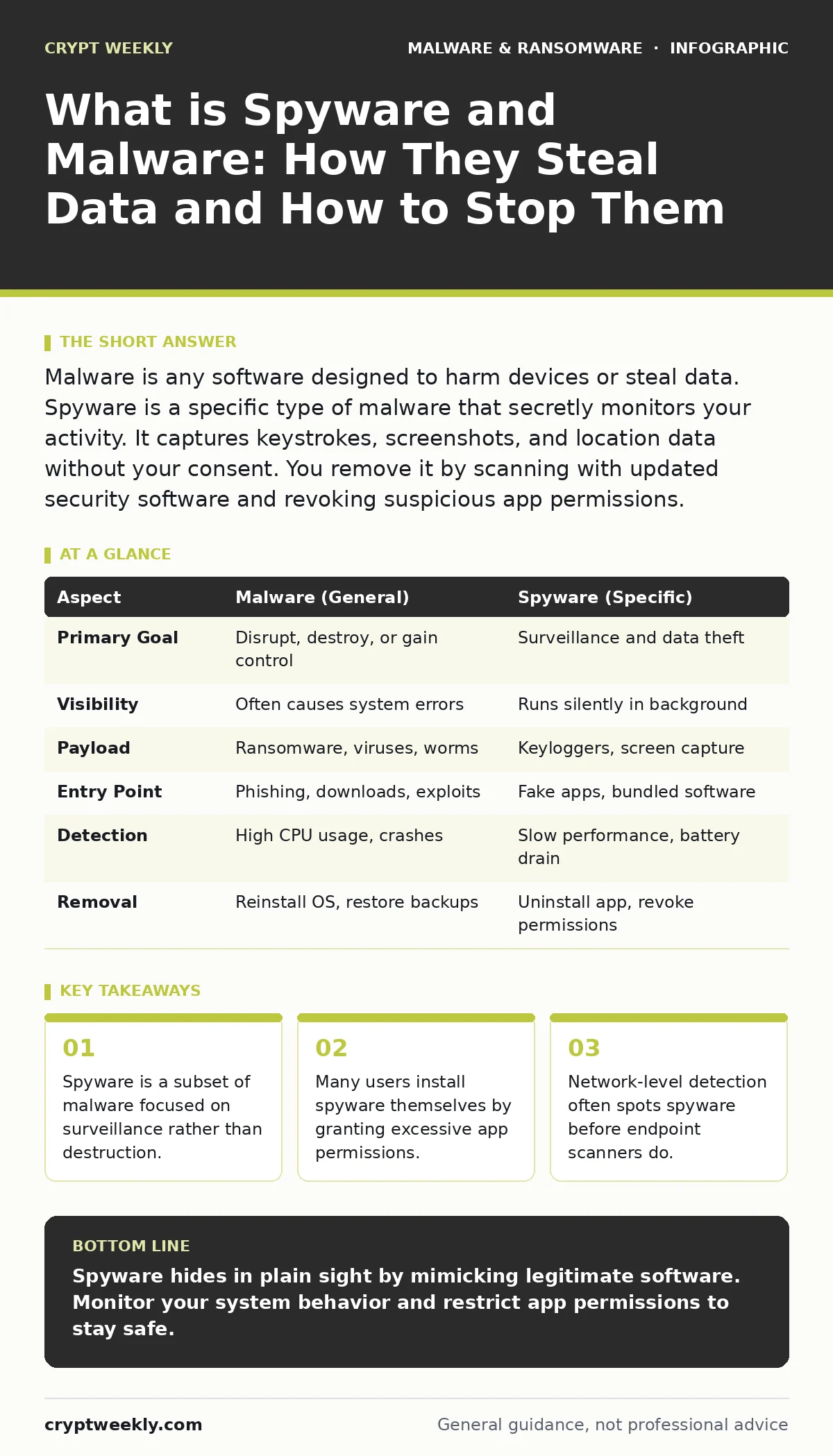
Malware is any software designed to harm devices or steal data. Spyware is a specific type of malware that secretly monitors your activity. It captures keystrokes, screenshots, and location data without your consent. You remove it by scanning with updated security software and revoking suspicious app permissions.
Everyday Analogy for Digital Theft
Imagine you leave a notebook open on your desk. A stranger walks in, sits silently in the corner, and writes down every word you type. They do not steal the notebook. They do not break the computer. They simply watch. This is how spyware works. It does not always crash your system. It does not always demand payment. It creates a ghost in the machine that records your life.
Malware is the umbrella term for all hostile software. Spyware falls under this umbrella. Other types include viruses that replicate themselves and ransomware that locks files. Understanding the difference matters because the defense strategies differ. You stop a virus by isolating it. You stop spyware by removing its access to your data.
What is Spyware and Malware
When you ask what is spyware and malware, you are asking about intent and mechanism. Malware covers any program written with malicious intent. This includes worms, trojans, and adware. Spyware is specifically designed to gather information. It runs in the background. It sends that information to a remote server.
The distinction is vital for remediation. If a virus corrupts your files, you restore from backup. If spyware steals your credentials, you change passwords. The damage from spyware is often invisible for months. You might not notice until your bank account drains or your identity is stolen. The software itself may consume minimal resources. It hides its processes to avoid detection by standard task managers.
At a Glance: Key Differences
| Aspect | Malware (General) | Spyware (Specific) |
|---|---|---|
| Primary Goal | Disrupt, destroy, or gain control | Surveillance and data theft |
| Visibility | Often causes system errors | Runs silently in background |
| Payload | Ransomware, viruses, worms | Keyloggers, screen capture |
| Entry Point | Phishing, downloads, exploits | Fake apps, bundled software |
| Detection | High CPU usage, crashes | Slow performance, battery drain |
| Removal | Reinstall OS, restore backups | Uninstall app, revoke permissions |
How Spyware Works in Practice
Spyware requires two things: access and exfiltration. It gains access through user error or software flaws. You might download a free game that bundles a tracker. You might click a link that exploits a browser vulnerability. Once inside, it installs hooks into your operating system. These hooks allow it to intercept data before you even see it.
Exfiltration happens over the network. The spyware compresses your data and sends it to a command-and-control server. This traffic often looks like normal web browsing. It uses standard protocols to blend in. Some advanced variants use encryption to hide the content of their transmissions. This makes network monitoring tools less effective. You need endpoint detection to see what the software is doing on your disk.
Who Gets Targeted and Why
Spyware targets anyone with valuable data. This includes students, employees, and executives. Attackers often choose targets based on ease of access rather than value. A student with weak security settings is an easy win. An employee with access to company servers is a high-value target.
The motive is usually financial. Stolen credentials sell on dark web markets. Personal data fuels identity theft. Corporate espionage aims at trade secrets. Some spyware is state-sponsored. It aims to monitor political dissidents or journalists. The sophistication varies. Basic spyware targets mass audiences. Advanced spyware targets specific individuals. You are not safe just because you are not famous. Your data has value to data brokers and criminals alike.
What People Usually Get Wrong
Many users believe that antivirus software stops all spyware. This is a dangerous assumption. Traditional antivirus relies on signatures. It looks for known bad code. New spyware variants do not have signatures yet. They bypass static detection. You need behavioral analysis. This technology watches what programs do, not just what they are.
Another common error is trusting app store reviews. Attackers create fake apps with thousands of positive reviews. These reviews are bot-generated. The app looks legitimate. It has a polished interface. It asks for reasonable permissions at first. Then it updates to request more access. You must check permissions manually. Do not rely on stars or download counts.
How to Detect and Remove Spyware
Detection starts with observation. Watch for unusual battery drain. Notice if your fan runs loudly when idle. Check for unknown apps in your installation list. Review your network connections. Look for traffic to unfamiliar domains. These signs suggest something is running in the background.
Removal requires a systematic approach. First, disconnect from the network. This stops data exfiltration. Second, boot into safe mode. This prevents the spyware from loading. Third, run a full system scan. Use a reputable security tool. Fourth, check your browser extensions. Remove anything you do not recognize. Fifth, change your passwords. Do this from a clean device. Finally, enable two-factor authentication. This protects your accounts even if credentials were stolen.
Beyond Basic Defense
Stopping spyware requires more than just scanning. You must reduce your attack surface. This means minimizing the number of apps you install. It means keeping your operating system updated. Patches fix the vulnerabilities that spyware exploits.
Consider using browser isolation. This technology runs web pages in a remote container. If the page contains malware, it never touches your device. The code executes in the cloud. You see the content, but the threat stays contained. This adds a layer of protection against drive-by downloads.
For deeper analysis, look into memory forensics. Some spyware lives only in RAM. It never writes to the disk. Traditional scanners miss it. Memory forensics tools capture a snapshot of your system's memory. They analyze this snapshot for hidden processes. This is advanced but effective against sophisticated threats.
Also review your macro security settings. Documents can carry spyware in macros. These are small scripts that run when you open a file. Disabling macros by default prevents automatic execution. You can enable them manually if you trust the source. This simple setting blocks many initial infections.
RELATED: For more on document safety, see our guide on macro security settings. For network protection, read about browser isolation. If you suspect a breach, understand ransomware backups.
Key takeaways
- Spyware is a subset of malware focused on surveillance rather than destruction.
- Many users install spyware themselves by granting excessive app permissions.
- Network-level detection often spots spyware before endpoint scanners do.
Spyware hides in plain sight by mimicking legitimate software. Monitor your system behavior and restrict app permissions to stay safe.
Frequently asked questions
Can spyware hide from antivirus?
Yes, advanced spyware uses rootkit techniques to hide its files and processes from standard security software. Behavioral analysis is required to detect it.
Does turning off WiFi stop spyware?
No, the spyware remains on your device. It stops sending data, but the infection persists. You must remove the software manually to eliminate the threat.
Is spyware the same as a virus?
No, a virus replicates itself to spread. Spyware focuses on surveillance. Spyware is a type of malware, but not all malware is spyware.
How do I know if I have spyware?
Look for unexplained battery drain, slow performance, or unknown apps. Check your network traffic for connections to strange domains. Run a behavioral scan.
How this guide was produced: written by the Crypt Weekly editorial team with AI assistance, checked against the public references listed below, and reviewed when the facts change. See our editorial policy or report an error.