Trojans require your permission to enter, while viruses replicate themselves to spread, creating distinct operational risks that demand different defense strategies.
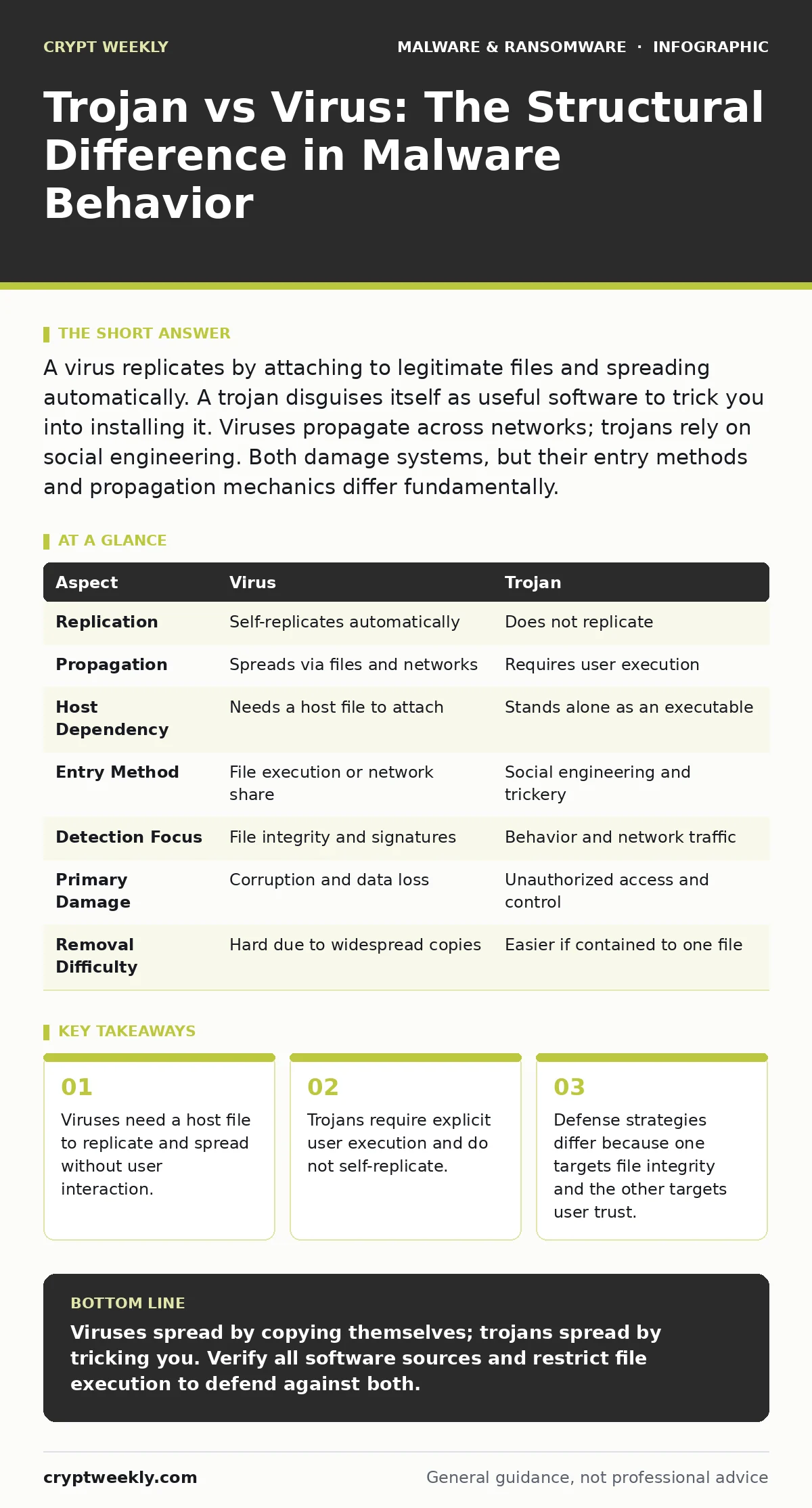
A virus replicates by attaching to legitimate files and spreading automatically. A trojan disguises itself as useful software to trick you into installing it. Viruses propagate across networks; trojans rely on social engineering. Both damage systems, but their entry methods and propagation mechanics differ fundamentally.
The Core Mechanism of Self-Replication
A computer virus is a piece of code that inserts itself into other programs or documents. It relies on a host file to survive and spread. When you open an infected file, the virus activates and copies itself to other files on your system or network. It operates like a biological virus, needing a living cell to reproduce. This automatic replication is the defining characteristic that separates it from other malware types.
The danger lies in its spread. You might receive a document that looks normal. Opening it triggers the virus, which then attaches itself to every other document you edit. Before you realize anything is wrong, your entire drive is infected. This behavior makes viruses particularly dangerous in shared network environments, where one infected workstation can compromise many others rapidly.
The Deception of the Trojan Horse
A trojan, named after the wooden horse from Greek mythology, hides malicious code inside seemingly legitimate software. It does not replicate itself. Instead, it waits for you to run it. The malware author packages the malicious payload with a useful-looking application, such as a game crack or a utility tool. You choose to install it because you want the function it promises.
Once executed, the trojan performs its hidden task. This might be stealing your credentials, installing a backdoor, or encrypting your files. Because it does not copy itself to other files, it stays where you installed it. Its power comes from the trust you placed in the software. If you never run the file, the trojan remains dormant and harmless to your system.
Comparison of Operational Traits
Understanding the structural differences helps you identify the threat model. Viruses target file systems and network shares. Trojans target user behavior and application privileges. The table below outlines the key distinctions in how they operate and how they are detected.
| Aspect | Virus | Trojan |
|---|---|---|
| Replication | Self-replicates automatically | Does not replicate |
| Propagation | Spreads via files and networks | Requires user execution |
| Host Dependency | Needs a host file to attach | Stands alone as an executable |
| Entry Method | File execution or network share | Social engineering and trickery |
| Detection Focus | File integrity and signatures | Behavior and network traffic |
| Primary Damage | Corruption and data loss | Unauthorized access and control |
| Removal Difficulty | Hard due to widespread copies | Easier if contained to one file |
Where the Boundaries Blur
Modern malware often combines these traits. A trojan might download a virus from the internet after you install it. A virus might carry a trojan payload that opens a remote access tool. This hybrid approach makes classification difficult. Security tools often look at behavior rather than just the label. If the code replicates, it has viral properties. If it deceives the user to gain access, it has trojan properties.
This overlap means you cannot rely on a single definition for protection. You must defend against both mechanisms. A system protected against file replication might still fall to a trojan if the user runs a malicious installer. Conversely, a system that verifies all installers might still be vulnerable to a virus spreading through shared drives.
Choosing Your Defense Strategy
You should prioritize different controls based on the threat. The following lists outline when to focus on each type of defense.
Choose the virus defense when:
- You share files across a network or use removable drives.
- You work with documents from untrusted sources.
- You need to ensure file integrity across multiple systems.
- You want to prevent automatic spread between workstations.
Choose the trojan defense when:
- Users frequently download software from the internet.
- You have high-value accounts that need credential protection.
- You want to limit what applications can run on your system.
- You need to monitor outbound network connections for data theft.
See also: Sandboxing Misconceptions: What Static Analysis Actually Misses · Memory Forensics Misconceptions: What Analysts Get Wrong
Practical Implementation Steps
Defending against viruses requires strict control over file execution and sharing. Implement application allowlisting to ensure only approved software runs. This stops viruses from executing even if they infect a file. Regularly scan shared drives and removable media. Keep your operating system updated to patch vulnerabilities that viruses exploit for propagation.
Defending against trojans requires user awareness and network monitoring. Train users to recognize social engineering tactics. Verify software sources before installation. Use antivirus software that monitors behavior, not just known signatures. Check your macro security settings to prevent automated scripts from running in documents. Monitor network traffic for unusual outbound connections that might indicate a trojan sending data.
The Human Element in Security
Viruses exploit technical vulnerabilities in file handling and network protocols. Trojans exploit psychological vulnerabilities in trust and curiosity. A virus can infect your system even if you are careful, if you open an infected file from a trusted colleague. A trojan only works if you bypass your caution and run an unverified program.
This distinction changes how you train your users. For viruses, emphasize the risks of sharing files and using removable media. For trojans, emphasize the risks of downloading software and clicking links. Both require vigilance, but the triggers are different. One is accidental; the other is intentional.
Overlapping Threats and Hybrid Malware
Some malware families exhibit traits of both. A worm is a virus that spreads over networks without user interaction. A trojan might install a worm to spread further. Understanding the base mechanics helps you dissect these hybrids. Look for replication to identify viral components. Look for deception to identify trojan components.
When analyzing an incident, ask how the malware entered and how it spread. If it spread automatically, it has viral traits. If it required a user to run it, it has trojan traits. This analysis guides your containment strategy. Isolate the network to stop viral spread. Revoke user privileges to stop trojan activity.
Key takeaways
- Viruses need a host file to replicate and spread without user interaction.
- Trojans require explicit user execution and do not self-replicate.
- Defense strategies differ because one targets file integrity and the other targets user trust.
Viruses spread by copying themselves; trojans spread by tricking you. Verify all software sources and restrict file execution to defend against both.
Frequently asked questions
Can a trojan replicate itself?
No, a trojan does not replicate. It relies on the user to install it or for other malware to spread it.
Is a worm a virus or a trojan?
A worm is a type of virus that spreads over networks without needing a host file or user action.
How do I remove a virus?
Isolate the infected system, run a full scan with updated security tools, and restore files from a clean backup.
How do I remove a trojan?
Uninstall the suspicious software, change all passwords, and scan for backdoors or additional payloads.
How this guide was produced: written by the Crypt Weekly editorial team with AI assistance, checked against the public references listed below, and reviewed when the facts change. See our editorial policy or report an error.