Encryption secures the message content during transit and at rest, but it leaves the subject line, recipient addresses, and metadata fully visible to service providers.
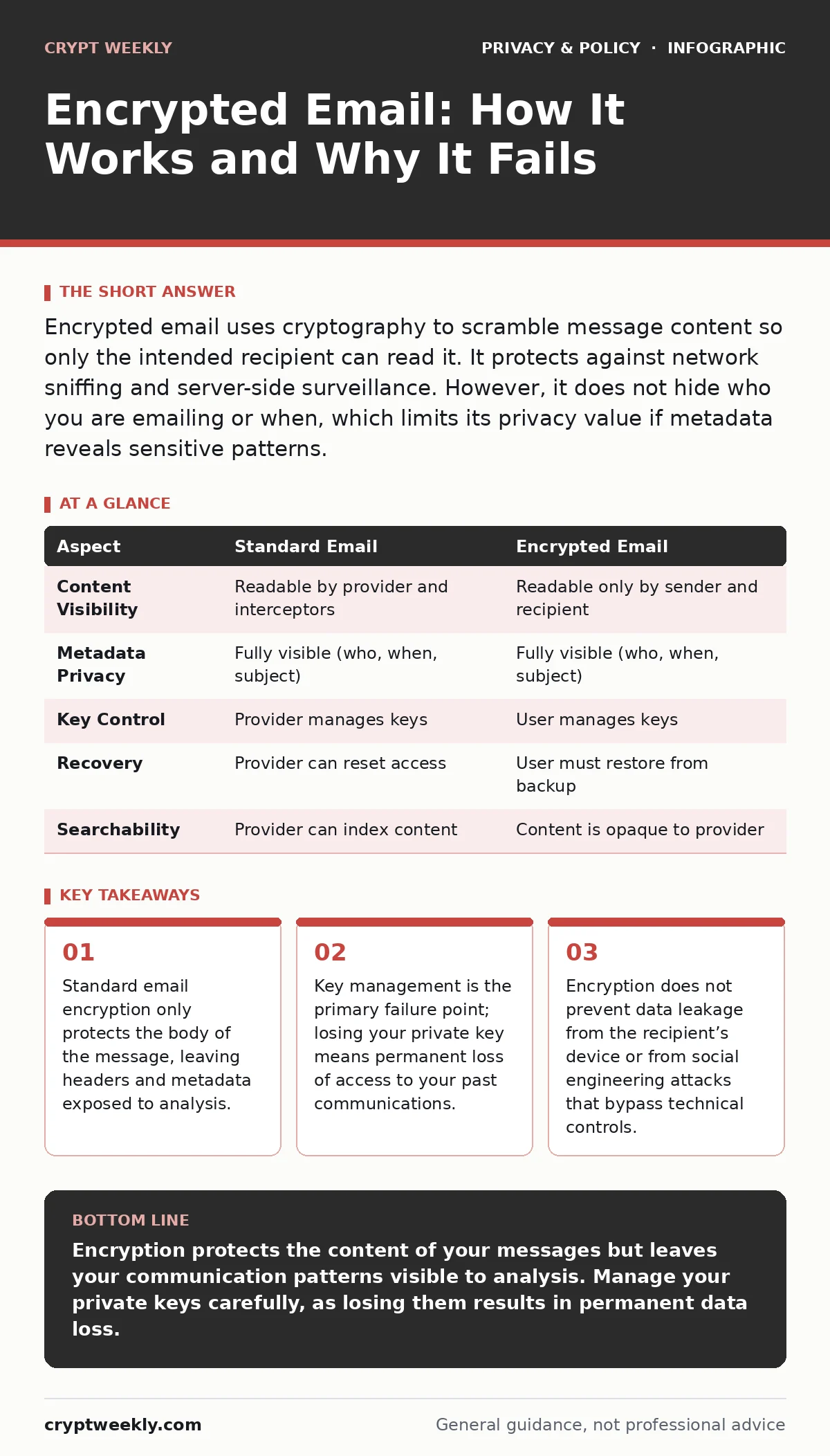
Encrypted email uses cryptography to scramble message content so only the intended recipient can read it. It protects against network sniffing and server-side surveillance. However, it does not hide who you are emailing or when, which limits its privacy value if metadata reveals sensitive patterns.
The Postcard Versus The Sealed Letter
Imagine sending a postcard. Anyone who handles it can read the message, the sender, and the recipient. Now imagine placing that same message inside a sealed, locked box. The postal worker can see who sent the box and who it is for, but they cannot see what is inside. This is the fundamental difference between standard email and encrypted email.
Standard email travels across the internet in plain text, or with only superficial transport-layer encryption that expires once the message reaches the server. Encrypted email applies end-to-end encryption, a method where data is scrambled on your device and remains scrambled until it reaches the recipient’s device. No intermediary, including the email provider, can read the content.
This distinction matters because most users assume that logging into a secure website means their data is private. It does not. The service provider usually holds the keys to decrypt and store your messages, often scanning them for advertising or legal compliance. End-to-end encryption removes the provider from the loop entirely.
What Encrypted Email Actually Solves
The primary problem encrypted email solves is interception. When data travels between servers, it passes through dozens of network nodes. Without strong encryption, any node can copy or modify the data. This is known as a man-in-the-middle attack.
Encrypted email also solves the problem of server-side surveillance. If an email provider stores your messages in plain text, a compromised database or a subpoena can expose your history. With end-to-end encryption, the provider stores only unreadable ciphertext. Even if they want to hand over your messages, they cannot.
However, it does not solve all privacy issues. It does not stop the recipient from taking a screenshot. It does not stop the recipient’s device from being infected with spyware. It also does not hide the fact that you communicated. If you are trying to conceal the existence of a relationship, encryption alone is insufficient. You need to understand what remains visible.
| Aspect | Standard Email | Encrypted Email |
|---|---|---|
| Content Visibility | Readable by provider and interceptors | Readable only by sender and recipient |
| Metadata Privacy | Fully visible (who, when, subject) | Fully visible (who, when, subject) |
| Key Control | Provider manages keys | User manages keys |
| Recovery | Provider can reset access | User must restore from backup |
| Searchability | Provider can index content | Content is opaque to provider |
The Mechanics of Public Key Cryptography
Encrypted email typically relies on public-key cryptography. This system uses two mathematically linked keys: a public key and a private key. You share your public key with anyone who wants to send you a secure message. They use it to encrypt their message. Only your private key can decrypt it.
This is asymmetric encryption. Unlike a password, which is symmetric (the same key locks and unlocks), the public key can only lock. This allows anyone to send you secure data without ever having to share a secret with you first.
The private key must never leave your device. If you lose it, you lose access to your encrypted messages forever. There is no "forgot password" button. This is the hidden cost of true privacy. You become the sole administrator of your security infrastructure. If your hard drive fails and you have no backup, your history is gone.
The Metadata Trap
Most users focus on the message body and ignore the headers. This is a critical error. Metadata is data about data. In email, this includes the sender address, recipient address, timestamp, subject line, and IP addresses of the servers involved.
Encryption does not hide metadata. If you send an encrypted email with the subject "Project Titan Proposal" to a competitor, the encryption protects the proposal text. It does not protect the fact that you sent it. Analysts can build detailed profiles of your relationships and activities using only metadata.
This is why browser fingerprinting is often a greater threat to your identity than unencrypted traffic. Even if your content is safe, your device’s unique configuration can link your encrypted activity to your real-world identity. Encryption protects the payload, not the envelope.
Integrating With Other Defences
Encrypted email is not a standalone solution. It fits into a broader security posture. You must manage your credentials securely. If an attacker gains access to your email account via a weak password, they can reset your encryption keys or read your unencrypted incoming mail. Using password managers for families or individual password managers ensures that your email account access is protected by strong, unique credentials.
You must also consider how you handle attachments. Encrypting the email body does not automatically encrypt the attached files. If you attach a PDF and send it, the PDF is separate. Some systems encrypt attachments automatically; others do not. You must verify this behavior.
Furthermore, consider cross-border data transfers. Even if your data is encrypted, the metadata may be processed in jurisdictions with weak privacy laws. The location of the server processing the headers can matter for legal exposure.
See also: Email Tracking Pixels: Risks and Protection for Small Businesses
Common Misconceptions About Security
Many users believe that if they see a padlock icon in their browser, their email is fully private. This is false. The padlock indicates a secure connection to the webmail interface (HTTPS). It does not indicate that the messages stored on the server are encrypted against the provider.
Another misconception is that encryption prevents all leaks. It does not. If you forward an encrypted message to someone who does not have the proper keys, the system may fail or strip the encryption. Social engineering remains the most effective way to bypass encryption. An attacker can trick you into decrypting a message and reading it aloud, or into sending a password to a fake support agent.
Managing the Operational Burden
Using encrypted email introduces friction. You must exchange public keys with contacts. You must keep your private key backed up. You must update your software regularly to patch cryptographic libraries.
This friction is a feature, not a bug. It discourages casual misuse and ensures that only committed users adopt the technology. However, it also means that encrypted email is not practical for every communication. Use it for sensitive data, legal documents, and private correspondence. Use standard email for newsletters and low-risk notifications.
Do not ignore mobile app permission abuse when using encrypted email apps on smartphones. An app that requests access to your contacts, microphone, or camera may undermine the privacy benefits of the encryption. Review permissions rigorously.
What Happens When You Lose Access
The most overlooked aspect of encrypted email is recovery. In standard email, if you forget your password, the provider sends a reset link. In end-to-end encrypted systems, the provider often cannot help you. They do not have your private key.
You must create a secret key backup when you set up the account. This is usually a file or a long string of text. Store it offline, in a physical location. If you lose this backup and your device is wiped, your email history is permanently inaccessible.
This is a trade-off. You gain privacy from the provider by taking on the responsibility of key management. You are no longer a customer; you are a system administrator.
Key takeaways
- Standard email encryption only protects the body of the message, leaving headers and metadata exposed to analysis.
- Key management is the primary failure point; losing your private key means permanent loss of access to your past communications.
- Encryption does not prevent data leakage from the recipient’s device or from social engineering attacks that bypass technical controls.
Encryption protects the content of your messages but leaves your communication patterns visible to analysis. Manage your private keys carefully, as losing them results in permanent data loss.
Frequently asked questions
Does encrypted email hide who I am emailing?
No, the sender and recipient addresses, subject lines, and timestamps are typically visible to the email provider and network observers.
Can I recover my encrypted email if I forget my password?
Usually not. If you lose your private key or recovery phrase, the email provider cannot decrypt your messages for you.
Is encrypted email safe from hackers?
It protects data in transit and at rest, but it does not protect against malware on your device or social engineering attacks.
Do I need to encrypt every email I send?
No, use it only for sensitive information. For routine communication, standard email is more convenient and sufficient.
How this guide was produced: written by the Crypt Weekly editorial team with AI assistance, checked against the public references listed below, and reviewed when the facts change. See our editorial policy or report an error.